• CV
  • Contact
  • Italiano
  • CV
  • Contact
  • Italiano

Content Design › EE

Network features

Sole content designer, working alongside UX designers and the Product Owner.

The redesign of the network features management interface in EE Mobile Manager aimed to make existing features easier to use and introduce 18 new ones.

While reviewing the existing features, I identified problems with how they were organised, unclear naming and inconsistent toggle behaviour. Rather than jumping straight into the interface redesign, I proposed addressing these underlying issues first, using initial reorganisation proposals to demonstrate why the features themselves needed rethinking.

I advocated for this approach through discussions with the Product Owner, developers and other stakeholders, including people outside the project team. This led to the approval of a preliminary review, which became an integral part of the redesign.

The work established a clearer, more consistent structure for both existing and new features, providing the foundation for redesigning how they are managed in Mobile Manager.

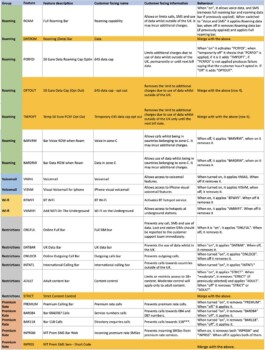
Il documento delle funzionalità: gruppo, nome tecnico, descrizione, nome per i clienti, informazioni e funzionamento

One step back

To make the network features easier to understand, I reviewed their names, descriptions and tooltips, but focused above all on how they were organised and how they worked.

In the legacy interface, features appeared in a single list, with no meaningful grouping to help users find their way around. This made it difficult to locate the right option quickly, while unclear names and inconsistent behaviour made individual features harder to understand.

I documented my proposed changes in a spreadsheet, specifying each feature’s name, description, category and intended behaviour. This became the basis for discussions with the Product Owner, developers and stakeholders, helping us reach an agreed solution.
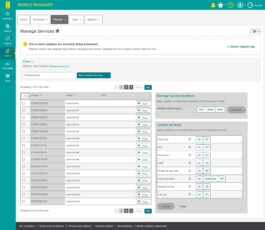
Manage Services with the yellow notice about updates still being processed and the Check request log link
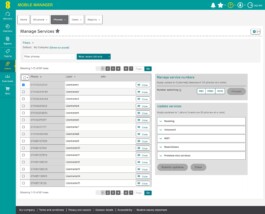
Network features panel with features grouped into Roaming, Voicemail, Wi-fi, Restrictions and Premium rate services

A place for everything

The new taxonomy grouped network features into categories based on their purpose, making individual features easier to find and the differences between them easier to understand.

This structure was adopted in the redesigned interface, allowing users to navigate a wider range of options, including the 18 new features, without adding unnecessary complexity.
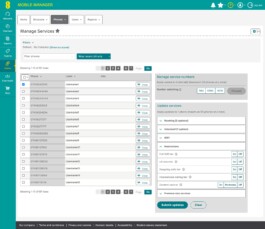
Close-up of the feature groups, including Restrictions

When on means off

Features designed to block a service worked in the opposite way to other features: switching them on meant applying a restriction.

To avoid confusion over what each toggle meant, I proposed grouping these features into a dedicated Restrictions category, clearly distinguishing them from features used to enable a service.
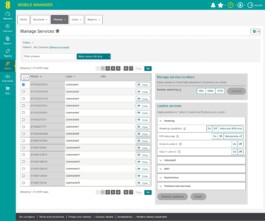
Roaming group expanded: Roaming capability with On, Off and Voice and SMS only options

A matter of logic

Some features belonged in a particular category but behaved in the opposite way to the others. Full roaming bar, for example, was clearly a roaming feature and needed to stay in that group. However, while the other features enabled a service, switching Full roaming bar on actually blocked it.

To address this inconsistency at its source, I proposed renaming it Roaming capability and reversing its logic during the preliminary review. This meant that switching it on would enable roaming, bringing it into line with the other features in the group.

Manage Services with the yellow notice about updates still being processed and the Check request log link
Network features confirmation message with processing times highlighted

Reducing uncertainty

In the latest iteration of the confirmation message, we made the information about processing times more accurate. This helps users understand when to expect their updates to be completed, setting clearer expectations about how long the process will take.
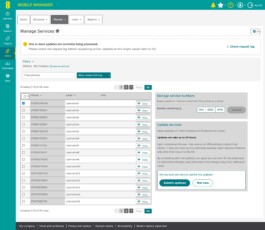
Update services with the confirmation message: processing time of up to 24 hours highlighted, and the Submit updates and Not now buttons

With the network features reorganised and easier to manage, we turned our attention to other operations in Mobile Manager: PAC and STAC code requests and disconnections.

Services management →

Content Design › EE

Network features

Sole content designer, working alongside UX designers and the Product Owner.

The redesign of the network features management interface in EE Mobile Manager aimed to make existing features easier to use and introduce 18 new ones.

While reviewing the existing features, I identified problems with how they were organised, unclear naming and inconsistent toggle behaviour. Rather than jumping straight into the interface redesign, I proposed addressing these underlying issues first, using initial reorganisation proposals to demonstrate why the features themselves needed rethinking.

I advocated for this approach through discussions with the Product Owner, developers and other stakeholders, including people outside the project team. This led to the approval of a preliminary review, which became an integral part of the redesign.

The work established a clearer, more consistent structure for both existing and new features, providing the foundation for redesigning how they are managed in Mobile Manager.

Il documento delle funzionalità: gruppo, nome tecnico, descrizione, nome per i clienti, informazioni e funzionamento

One step back

To make the network features easier to understand, I reviewed their names, descriptions and tooltips, but focused above all on how they were organised and how they worked.

In the legacy interface, features appeared in a single list, with no meaningful grouping to help users find their way around. This made it difficult to locate the right option quickly, while unclear names and inconsistent behaviour made individual features harder to understand.

I documented my proposed changes in a spreadsheet, specifying each feature’s name, description, category and intended behaviour. This became the basis for discussions with the Product Owner, developers and stakeholders, helping us reach an agreed solution.

Manage Services with the yellow notice about updates still being processed and the Check request log link
Network features panel with features grouped into Roaming, Voicemail, Wi-fi, Restrictions and Premium rate services

A place for everything

The new taxonomy grouped network features into categories based on their purpose, making individual features easier to find and the differences between them easier to understand.

This structure was adopted in the redesigned interface, allowing users to navigate a wider range of options, including the 18 new features, without adding unnecessary complexity.

Close-up of the feature groups, including Restrictions

When on means off

Features designed to block a service worked in the opposite way to other features: switching them on meant applying a restriction.

To avoid confusion over what each toggle meant, I proposed grouping these features into a dedicated Restrictions category, clearly distinguishing them from features used to enable a service.

Roaming group expanded: Roaming capability with On, Off and Voice and SMS only options

A matter of logic

Some features belonged in a particular category but behaved in the opposite way to the others. Full roaming bar, for example, was clearly a roaming feature and needed to stay in that group. However, while the other features enabled a service, switching Full roaming bar on actually blocked it.

To address this inconsistency at its source, I proposed renaming it Roaming capability and reversing its logic during the preliminary review. This meant that switching it on would enable roaming, bringing it into line with the other features in the group.

Manage Services with the yellow notice about updates still being processed and the Check request log link
Network features confirmation message with processing times highlighted

Reducing uncertainty

In the latest iteration of the confirmation message, we made the information about processing times more accurate. This helps users understand when to expect their updates to be completed, setting clearer expectations about how long the process will take.

Update services with the confirmation message: processing time of up to 24 hours highlighted, and the Submit updates and Not now buttons

With the network features reorganised and easier to manage, we turned our attention to other operations in Mobile Manager: PAC and STAC code requests and disconnections.

Services management →