• CV
  • Contact
  • Italiano
  • CV
  • Contact
  • Italiano

Content Design › EE

Services management

Sole content designer, working alongside UX designers and the Product Owner.

After rethinking how the network features were organised and how they worked, we turned our attention to other operations businesses could manage independently in Mobile Manager.

In particular, we needed to simplify requests for PAC and STAC codes, used to switch mobile providers while keeping an existing number or getting a new one, respectively, as well as INFO codes and disconnections, which permanently close a line.

Our goal was to bring these operations together in a simpler, more consistent management experience, while improving the interface structure and making room for new services.

The redesign brought different service management operations together in a clearer, better-organised interface, making requests easier to access and creating a flexible structure ready to accommodate new features.

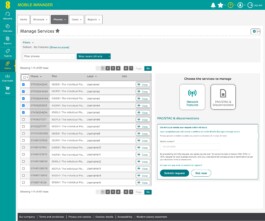
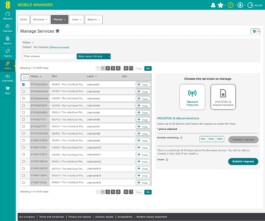
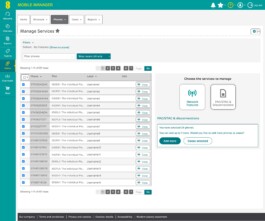
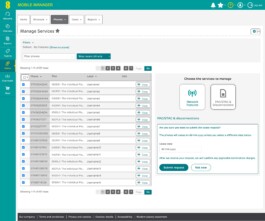
PAC/STAC & disconnections panel with separate code and disconnection requests
PAC selected
PAC confirmation
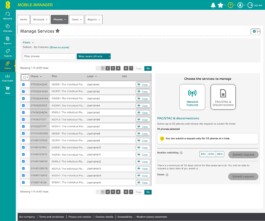
Warning: more than 30 phones
Cease with one phone
Add more
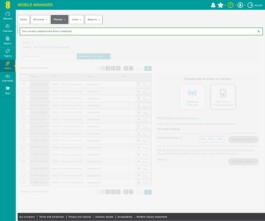
Cease confirmation
Request submitted
Panel with a single Request selector (PAC, STAC, INFO, CEASE) and one Submit request button
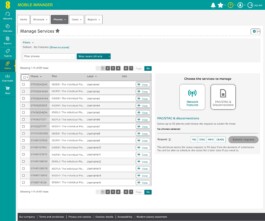
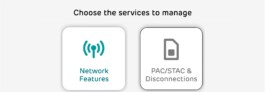
The Network Features and PAC/STAC & Disconnections cards

A structure built to grow

The platform needed to accommodate new services without making the interface more complex.

We introduced a card-based layout that makes it possible to add more options while keeping the service selection area compact and easy to navigate, without disrupting the balance with the device selection area.
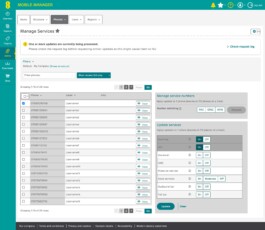
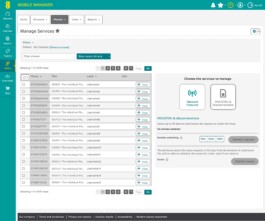
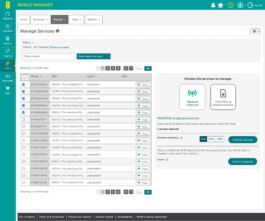
Manage Services: one phone selected, Roaming and IDD set to On, and the Update button enabled
PAC/STAC & disconnections panel with separate code and disconnection requests

Bringing separate operations together

Previously, disconnection requests were handled in a different area from PAC, STAC and INFO code requests.

We brought both types of operation into the same section, initially keeping separate request flows.

Manage Services: one phone selected, Roaming and IDD set to On, and the Update button enabled
Panel with a single Request selector (PAC, STAC, INFO, CEASE) and one Submit request button

Two requests in one

In a later design iteration, we simplified the interface further by bringing all the operations together in a single selector.

Users can choose the type of request and submit it using a single button. Information about the notice period required for disconnection appears directly below the selector.
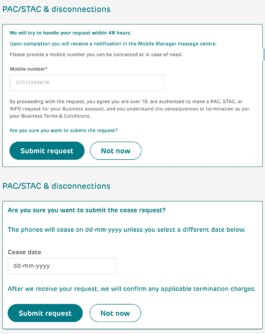
PAC request confirmation and disconnection confirmation

Confirmations that leave no doubt

PAC, STAC and INFO code requests and disconnection requests needed different confirmation messages.

I restructured and simplified the existing confirmation messages to make it easier to understand what would happen after submitting a request. For disconnections, I wrote a new message clarifying the scheduled line closure date and information about any applicable charges.
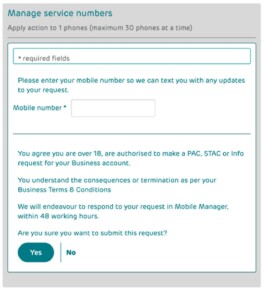
Previous confirmation message for code requests

Content Design › EE

Services management

Sole content designer, working alongside UX designers and the Product Owner.

After rethinking how the network features were organised and how they worked, we turned our attention to other operations businesses could manage independently in Mobile Manager.

In particular, we needed to simplify requests for PAC and STAC codes, used to switch mobile providers while keeping an existing number or getting a new one, respectively, as well as INFO codes and disconnections, which permanently close a line.

Our goal was to bring these operations together in a simpler, more consistent management experience, while improving the interface structure and making room for new services.

The redesign brought different service management operations together in a clearer, better-organised interface, making requests easier to access and creating a flexible structure ready to accommodate new features.

PAC/STAC & disconnections panel with separate code and disconnection requests
PAC selected
PAC confirmation
Warning: more than 30 phones
Cease with one phone
Add more
Cease confirmation
Request submitted
Panel with a single Request selector (PAC, STAC, INFO, CEASE) and one Submit request button
The Network Features and PAC/STAC & Disconnections cards

A structure built to grow

The platform needed to accommodate new services without making the interface more complex.

We introduced a card-based layout that makes it possible to add more options while keeping the service selection area compact and easy to navigate, without disrupting the balance with the device selection area.

Manage Services: one phone selected, Roaming and IDD set to On, and the Update button enabled
PAC/STAC & disconnections panel with separate code and disconnection requests

Bringing separate operations together

Previously, disconnection requests were handled in a different area from PAC, STAC and INFO code requests.

We brought both types of operation into the same section, initially keeping separate request flows.

Manage Services: one phone selected, Roaming and IDD set to On, and the Update button enabled
Panel with a single Request selector (PAC, STAC, INFO, CEASE) and one Submit request button

Two requests in one

In a later design iteration, we simplified the interface further by bringing all the operations together in a single selector.

Users can choose the type of request and submit it using a single button. Information about the notice period required for disconnection appears directly below the selector.

PAC request confirmation and disconnection confirmation

Confirmations that leave no doubt

PAC, STAC and INFO code requests and disconnection requests needed different confirmation messages.

I restructured and simplified the existing confirmation messages to make it easier to understand what would happen after submitting a request. For disconnections, I wrote a new message clarifying the scheduled line closure date and information about any applicable charges.

Previous confirmation message for code requests